Snowflake Intelligence: When Data Learns to Speak & AI Comes to the Data
Benita Zeug
Benita Zeug
Principal Consultant
Benita is a consultant with many years of experience in data management, data engineering and data warehousing and focuses on the migration, connection, processing and evaluation of data flows, both on-prem and in the cloud.
We'll show you how to get to actionable insights and decisions faster with Snowflake Intelligence. And: How to realize use cases and increase the ROI of your data platform: with little effort and without technical know-how.
Table of Contents
Snowflake Intelligence brings AI directly to where the data resides—into the Snowflake Data Cloud. In this article, we explain the interplay of Agents, Cortex AI, and RAG workflows to transform natural language into executable code, deep insights, and hybrid analyses from both structured and unstructured data. Beyond the technical background, you will also find real-world usage scenarios from the Health, Finance, Retail, and Manufacturing industries.
When Data Learns to Talk: Snowflake Intelligence
There is a new feature in the Snowflake ecosystem: Snowflake Intelligence. This is an AI/ML framework that features native integration of LLMs and generative AI functions, equipped with a clear and user-friendly interface.
Smart Helpers in the Background: Agents & Agent Concepts in Snowflake
To better assess and understand Snowflake Intelligence as a feature, it is essential to understand the underlying agent concept that it partially builds upon. We colloquially call an autonomously acting AI system an "Agent." Instead of working linearly, it uses a so-called "Thinking Loop." It thinks iteratively and can thereby independently understand, plan, execute, and evaluate tasks. This corresponds to the way we approach tasks ourselves:
Understand task ➡️ Make a plan ➡️ Execute plan ➡️ Check result ➡️ Correct if necessary/Plan next steps
This allows Agents to understand goals and tasks in natural language:
"What was my revenue in the last quarter?"
Translate this into (sub-)tasks, keywords: Revenue, last quarter
Complete resulting tasks: Generate and execute SQL query
The results are not just output but also evaluated and contextualized.
Agents are therefore always helpful when it is necessary to:
Automate complex tasks,
Translate natural language into SQL/Code,
Or quickly generate insights from many sources.
From Agent to Agent Concept
In doing so, they merge structured data (e.g., tables, views) with unstructured data (e.g., JSON) and combine and interpret this data simultaneously. This makes them often more flexible than classic automation, as they question, verify, and react dynamically. Through the approach of translating natural language into usable code in the background, they are ideally suited to provide business departments and non-IT personnel with insights. This significantly facilitates the democratization of data & AI.
Two Types within Cortex AI
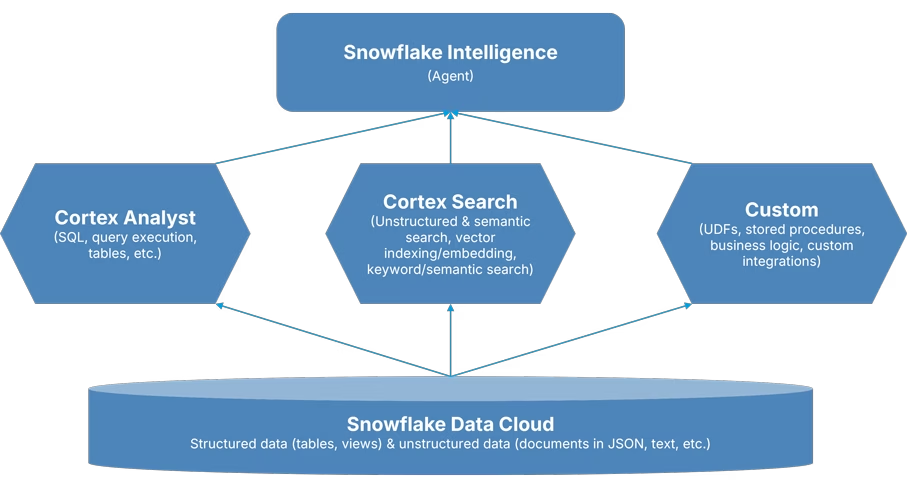
An addition to the principle of agents is important because Snowflake Intelligence builds on Cortex Agents. Cortex AI distinguishes between two types:
Cortex Analyst: Specialized in structured data within the Snowflake data platform (e.g., SQL & Query Execution on tables, views).
Cortex Search: Specialized in unstructured/text-based data, also from within the Snowflake data platform.
As a third, optional support, it is also possible to integrate external and proprietary tools and applications, for example: User-defined Functions, stored procedures, or other relevant metrics to incorporate more context. External APIs, such as Tavily, can also be integrated. Thus, Snowflake Intelligence connects all classic Snowflake functionalities and extends them in a user-friendly way with AI.
A Look Behind the Scenes: Look and Feel of the Snowflake Intelligence UI
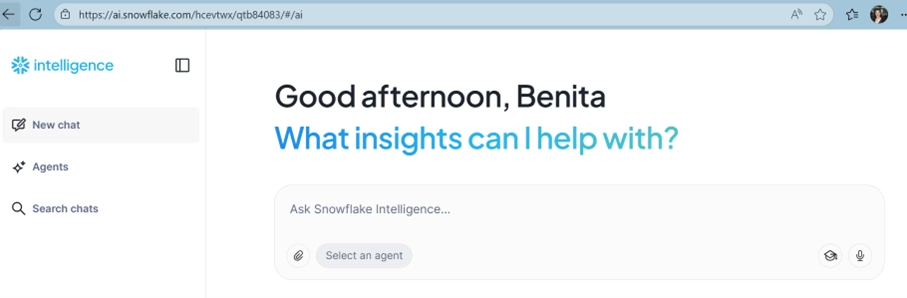
Figure 1: Snowflake Intelligence UI
Snowflake Intelligence presents itself primarily as a user-friendly UI kept in a classic "Chatbot Design," and it reacts exactly like one. Provided everything is set up and integrated in the background, you can start directly with the question, which can be conveniently entered into the chat window.
Snowflake Intelligence is based on the agent concept. Accordingly, the agents must be created and supplied with data before the first question can be asked.
The Process Flow with the Agent: From Question to Result
We will use a classic example and want to answer the question regarding the revenue of our products. First, we want to know how many products we have and what revenue they generated.
To do this, we ask our question in natural language. And since our agent is clever, the "task"—which our question represents—is now processed. First, the agent plans how the task can be carried out and which steps need to be orchestrated. Once planning is complete, the text field expands to show the planned steps.
Once all subtasks are completed, we receive the result in natural language: the count of all products. At the same time, there is a suggestion of what else could be derived. In our case, the possible question: "What is the total revenue of all products?" or "What did revenue look like at the product group level?".
Through these suggestions, the query is refined. If you select one, a classic aggregation regarding the products with a sum is created in the background.
So, we know products and revenues. Now we want to visualize the outputs from Snowflake Intelligence.
We can do this immediately, as quick visualizations are possible directly in Snowflake Intelligence without an additional external BI tool. However, this is only at a basic level with graphs, bar charts, and pie charts, and without extensive customization or adaptability. Graphics can thus be sent directly and used further.
Architecture Overview & Embedding of Snowflake Intelligence in the Snowflake Ecosystem
Figure 2: Overview of Agents and Interaction
The example demonstrated what the work process looks like. In the figure shown above, you can see the interaction between the individual agents and data storage again. All of this is embedded in the Snowflake ecosystem, which means that all known Snowflake features can also be utilized.
Governance & Security – What Needs to be Considered?
Snowflake Intelligence sits within the Snowflake ecosystem, just like Cortex AI. Therefore, the same rules for governance and security apply here as in the entire system. All queries and agents use the same user rights, roles, and warehouse settings as regular Snowflake queries. Users can thus still only access the information for which they have authorization.
Standards like RBAC and Masking also apply to agent operations and thus to Snowflake Intelligence. Special attention to governance and security is only required when integrating third-party providers via API—as is generally the case when connecting to/in the Snowflake data platform. Furthermore regarding data storage, Snowflake Intelligence can only access data within the Snowflake Data Cloud within the scope of user rights and roles. This means the data is and remains within your own ecosystem.
Beyond "Chatbot" – When Structure & Chaos Meet:
Anyone who now feels that Snowflake Intelligence is "just" an additional chatbot for data held in Snowflake is not entirely wrong. But that would be an oversimplification. Because Snowflake Intelligence offers far more than the "Q&A game" of a classic chatbot. This intelligent Snowflake Agent offers the following exciting features for users:
CortexAISQL
CortexAISQL is the extension of classic SQL using AI. Generative AI is embedded directly into normal SQL queries. Specifically, this means it can function as an interface for semantic and multimodal operations (e.g., texts, images, etc.). So, the classic, relational query meets semantic reasoning. This, in turn, facilitates the search for and query of data that hasn't been classically pre-processed or needs to be modified before use.
Retrieval & RAG Workflows
Retrieval & Retrieval Augmented Generation (RAG) is the approach where AI models (such as LLMs) retrieve additional, external information from a knowledge source and generate an answer based on it. The underlying knowledge is constantly expanded. The fact that an answer fits a query well is the responsibility of the underlying vector space. Every entered query is introduced into the vector space via embedding (a vector is calculated and stored), every possible answer is checked via vector matching, and the best possible one is output.
This makes answers precise, and the model hallucinates less frequently. However, retrieval and RAG workflows require an embedding infrastructure and often need to be tuned. With Snowflake Intelligence, this is eliminated—basically, RAG use cases can be implemented on top of it, albeit on a significantly smaller scale.
Hybrid Workflows
The interaction of structured and unstructured data, as well as the possible extension with customized logic, results in a powerful workflow that can be handled in a single step. Snowflake Intelligence thus significantly facilitates data merging.
This overview shows that Snowflake Intelligence is far more than a chatbot UI. Rather, AI & ML are now available directly in the Snowflake Data Platform, i.e., very close to the actual data. This close connection and the use of existing infrastructure result in efficient performance, without additional efforts for governance and security. The ability to execute both classic analytics and semantic use cases on the same platform results in great flexibility and versatility, allowing data to truly learn to speak.
Real World: Applications & Use Cases
Now that we have looked at how Snowflake Intelligence works, we want to show what real-world applications exist. Where can Snowflake Intelligence help—beyond answering questions or simply summarizing data? When does it make sense to use Snowflake Intelligence, and when does a more individual solution, such as a RAG architecture, make more sense?
Different Industries – Different Applications
Every industry has its own requirements. We present a few possible scenarios as examples—always assuming that Snowflake is already fully integrated as a data platform:
Health & Lifesciences
The Health and Lifesciences sector is virtually predestined for the use of Snowflake Intelligence. Here, patient data, clinical studies, documents, images, and audio data come together and should ideally be analyzable together. Questions like "Group all patients with similar symptoms, disease progressions, lab values, and diagnoses and evaluate possible therapy successes" can be made usable via a clinical chatbot and help in both healthcare and drug development. The evaluation of clinical studies or images and the integration of relevant regulations is thus possible quickly and in natural language.
Insurance & Finance
Especially when it comes to risk assessment, merging and assessing countless individual documents, often in different structures, is a challenge. Here, one can build a good model with automated evaluations of risk factors, expert opinions, reference judgments, and historical claims to perform a more secure risk assessment. For Fraud Detection, a vast amount of documents can be brought together and evaluated with the real assessment of a "thinking" agent. Auditability and assessments can also be well implemented this way—be it for training purposes or to record and implement required measures.
Retail & eCommerce
The Retail and eCommerce sector has been using and dealing with generative AI for a long time. Topics like Demand Forecasting, Category Management, and Consumer Experience are nothing new. Retail is fast and time-sensitive. With Snowflake Intelligence, these topics now become usable beyond "classic" Data Science teams and can thus be utilized and implemented faster.
Manufacturing
Sensors, IoT, and highly specialized machines are omnipresent in manufacturing. To date, this has led to manual control, maintenance, and specialized inquiries. The use of Predictive Maintenance—i.e., estimating when which machine/sensor has which requirements—as well as deviation analyses can accelerate manual efforts and, above all, time-consuming processes.
Conclusion
Using Snowflake Intelligence makes sense when Snowflake is already used as a base, a lot of information and data exists in different structures, and users can or must communicate in natural language. However, the agents must be configured and trained in a targeted manner beforehand. Only then can the available data from the Snowflake ecosystem be evaluated meaningfully.
Curious to hear what your data has to say? If you are thinking about using Snowflake Intelligence in your data platform or want to define your first use cases—get in touch with us! We are happy to support you from the initial idea to the final implementation. So that your data works perfectly for you.
Want To Learn More? Contact Us!
Your contact person
Helene Fuchs
Domain Lead Data Platform & Data Management
Your contact person
Pia Ehrnlechner
Domain Lead Data Platform & Data Management
Who is b.telligent?
b.telligent – that’s Data Analytics, AI, Customer Engagement, and Data Visualization. It’s Germany, Austria, Switzerland, and Romania. But most importantly, it’s our team: people with a true passion for data, working together to create innovative solutions that drive sustainable progress for businesses.
SAP and Snowflake have been partners for some time. Now, SAP Business Data Cloud (BDC) and Snowflake are becoming even more tightly integrated. What many have long been waiting for is now possible: data sharing— including SAP semantics—as a foundation for analytics and AI. We explain the key fundamentals, show how hyperscalers fit into the picture, outline the available models, and walk through the technical implementation. Above all, we explore the opportunities this integration creates.
Discover how Snowflake User-Defined Table Functions can bring data extraction into your dbt data pipelines. The article shows how to pull Salesforce data directly into Snowflake and materialize it in dbt models without a separate ingestion tool.
Snowflake’s Openflow makes data integration faster, simpler, and more efficient. In this article, we’ll show how these benefits play out in practice—using a real-world example to highlight strategies for handling large volumes of small incoming files with ease and performance.