SAP OData in Practice: The Complete Guide from SEGW to Service Activation
Samuel Krieg
Samuel Krieg
Senior Consultant
Samuel specializes in SAP-based data architecture and provisioning.
He has several years of experience in native SAP HANA development (especially HANA SQL) and has increasingly specialized in the connection and provision of data from SAP source systems (ECC 6.0 and S/4HANA, including via CDS views and OData).
OData is the language your SAP system uses to talk to the world today. We'll show you step by step how to turn an idea into a production-ready, delta-capable OData service in S/4HANA or ECC.
Table of Contents
This article walks you through the full lifecycle of an SAP OData service: from development in the Service Builder (SEGW), through registration in /IWFND/MAINT_SERVICE, to testing with the Gateway Client. You'll learn how to use the ODP framework to build robust, delta-capable interfaces for Fiori, cloud applications, and third-party systems. We'll also cover the most common pitfalls around registration, authorization, and delta handling and how to avoid them. By the end, you'll know exactly how a high-performance, future-proof OData interface comes together in SAP.
Why OData in the First Place?
Pure GUI transactions are on their way out in modern SAP landscapes. Whether you're building a Fiori app, connecting to the SAP Business Technology Platform, or integrating with Salesforce and Microsoft Power Automate, you need a standardized language for systems to talk to each other. That language is OData – Open Data Protocol.
OData exposes SAP data such as business partners, sales orders, or materials as a REST interface that's easy to consume – allowing external systems to access your SAP system securely and in a standardized way. Instead of complex RFCs and IDocs, it relies on standard HTTP methods like GET, POST, PUT, and DELETE.
This guide is written for ABAP developers and functional consultants who want to understand what's behind Fiori. We cover building the data model in SEGW, registering a service in /IWFND/MAINT_SERVICE, and troubleshooting with /IWFND/ERROR_LOG and the Gateway Client – for both SAP S/4HANA (embedded architecture) and SAP ECC (hub architecture).
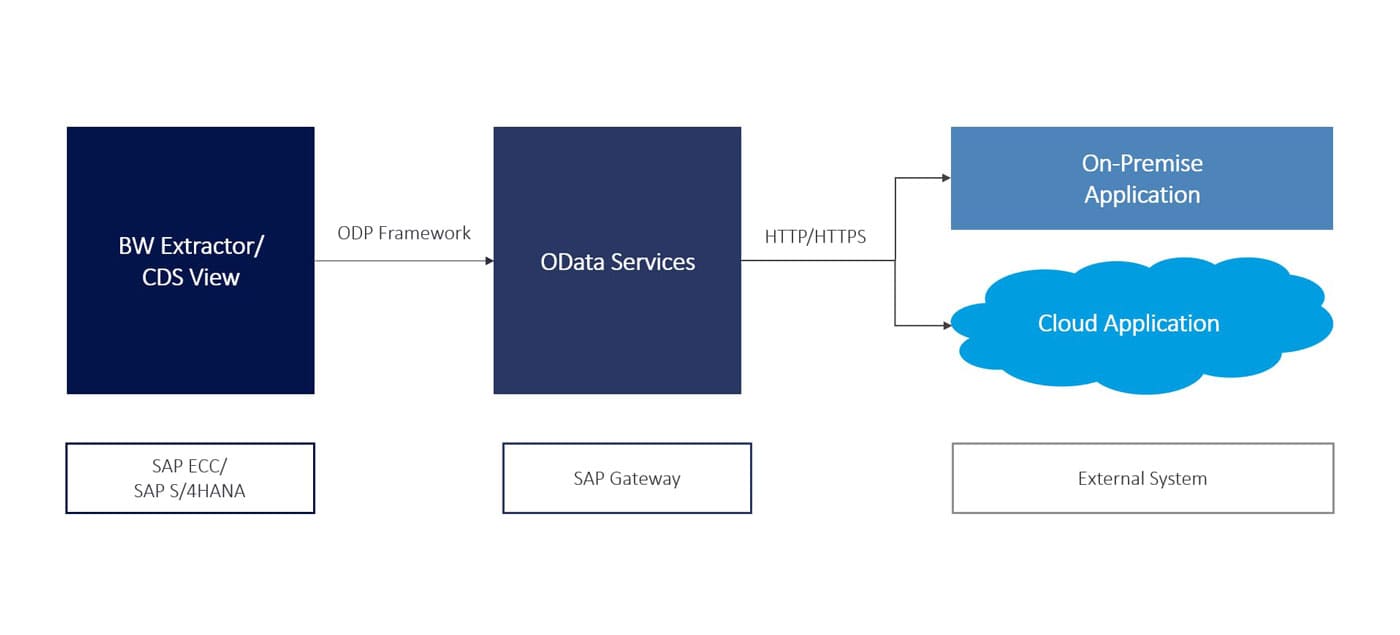
SAP Gateway architecture overview
Architecture First: The ODP Ban and What It Means for You
Before you configure a service, you need to know how you're getting your data. If you're building OData services for external data lakes (Snowflake, Azure, AWS) or BI tools, you can't avoid SAP Note 3255746.
The old way: Third-party tools connected via RFC to the ODP framework (Operational Data Provisioning), pretending to be an SAP BW system.
The new rule: SAP has restricted the ODP-RFC interface to SAP's own applications, such as SAP Datasphere or SAP BW/4HANA.
The consequence: For data access from non-SAP systems, the rule now is: you must use OData.
That makes ODP-based OData the only officially sanctioned method for external extraction that supports delta mechanisms (CDC).
Feature
ODP via RFC
ODP via ODATA
Standard ODATA
Consumer
SAP apps only (Datasphere, BW)
Third-party & Fiori
Fiori & lightweight apps
Protocol
TCP/IP (RFC)
HTTP/HTTPS (REST)
HTTP/HTTPS (REST)
Delta support
Yes (native)
Yes (via delta token)
No (unless specifically coded)
Performance
Very high
Medium (HTTP overhead)
Medium
Use case
Mass replication
ETL for non-SAP tools
Live transactional apps
Relevant SAP Notes:
3255746: ODP API – usage by non-SAP applications (the restriction)
2485457: Recommendations for exposing ODP data via OData
2356264: ODP extraction via OData – capabilities and limitations
Licensing Costs vs. System Performance: The Real Cost
When comparing OData with tools like SAP Datasphere, it's worth looking at two different types of cost.
Financial: In most on-premise and private cloud agreements, OData is part of the standard NetWeaver/S/4HANA license – no extra cost per call. Datasphere, on the other hand, requires its own premium license.
Technical – the hidden cost: OData runs on the application layer. For every record, the SAP application server has to build internal structures and then serialize them into an exchange format such as JSON or XML. That costs CPU and memory. If the Gateway runs directly on the S/4HANA instance (embedded), a large OData extraction competes with the work processes of your Finance and Sales users. Bulk extraction via OData during business hours can noticeably slow down the productive system.
The verdict: Use ODP-based OData for targeted integrations, Fiori apps, and moderate data volumes – license-free and efficient. For moving terabytes of data every day, use Datasphere or a comparable replication tool to protect your production environment.
Two Deployment Scenarios
Misunderstanding the architecture is the most common cause of later "Service Not Found" errors.
Embedded deployment (standard for S/4HANA): The Gateway components and backend logic run on the same system. Development (SEGW) and registration (MAINT_SERVICE) happen on the same instance – the simplest setup.
Hub deployment (common for ECC): A dedicated front-end server (Gateway) and a separate back-end server (ECC) work together. You develop on the backend but register the service on the front-end hub.
Understanding the ODP Framework
The ODP framework (Operational Data Provisioning) is usually associated with BW, but it's also a real win for OData developers: it exposes standard extractors – the same ones used for DataServices or BW – directly as an OData service, without any complex custom programming.
In S/4HANA: ODP is active by default and tightly integrated with CDS views.
In ECC: Check that your plugin levels (PI_BASIS or SAP_GWFND) are up to date.
Transaction RODPS_REPL_TEST: Use this to test whether an ODP source is ready for extraction. If it works here, it will work via OData too.
Technical prerequisites (ask your BASIS team for the appropriate sap_iw_fnd* roles):
SEGW – Service Builder (development)
/IWFND/MAINT_SERVICE – service registration (admin)
/IWFND/GW_CLIENT – Gateway Client (testing)
Phase 1: Development – Building an ODP-Compliant Service
In this phase, you build an OData service that wraps an existing SAP extractor or an ODP-enabled CDS view. That way, every data request gets logged in the Delta Queue Monitor (ODQMON) which is essential for troubleshooting and delta management. Transaction: SEGW.
Step 1 – Create the project:
Open transaction SEGW and select Create Project.
Enter a technical name (e.g., Z_ODATA_SALES_EXT) and a description.
Assign a development package ($TMP for testing) and confirm with Continue.
Step 2 – Redefine the data model via ODP extraction:
Instead of creating entities manually, you "borrow" structure and logic directly from the ODP framework.
Right-click Data Model → Redefine → ODP Extraction.
Choose the ODP context: SAPI for classic extractors (e.g., 2LIS_11_VAHDR), ABAP_CDS for CDS views with data extraction enabled, or BW for BW InfoProviders.
Select the matching ODP name via F4 search and confirm with Next.
Step 3 – Select artifacts:
The system reads the extractor's structure. Select the relevant node, optionally rename the entity set, and confirm with Next and Finish. SEGW automatically generates the entity types, entity sets, and mapping – no custom code is needed for populating data, since the generic Data Provider Class (DPC) handles that.
Step 4 – Generate runtime objects:
Via Generate Runtime Objects, the system proposes class names for the Model Provider Class (MPC) and DPC. Keep the standard naming convention (_MPC, DPC, MPC_EXT, _DPC_EXT). After assigning the package and clicking Save, you'll see a success message in the log.
Step 5 – Verify the implementation (optional):
A quick look at the generated DPC class shows methods inherited from /IWBEP/CL_MGW_PUSH_ABS_DATA – a sign that the class knows how to talk to ODQMON. That's why you don't need custom SELECT statements in GET_ENTITYSET.
Your service is now technically built, but still invisible: it doesn't respond to any HTTP calls yet. Next comes registration.
Phase 2: Registration and Activation
Now you make the service reachable over HTTP. Transaction: /IWFND/MAINT_SERVICE. For embedded deployments, this step happens on the S/4HANA system; for hub deployments, on the Gateway system.
Add the service:
Open /IWFND/MAINT_SERVICE and click Add Service.
Choose the system alias – the critical field that determines where the backend code lives. For embedded: LOCAL. For hub: the alias of the backend ECC system.
Enter the technical name of your SEGW project as the External Service Name and confirm with Enter or Get Services.
Register the service:
Click the service in the list, then assign the package in the pop-up ($TMP for testing, otherwise your development package).
Leave ICF Node on "Standard Mode" – this automatically creates the node in the Internet Communication Framework (SICF).
Verify the system alias assignment and confirm with the checkmark.
Success message: the service was created and its metadata loaded successfully.
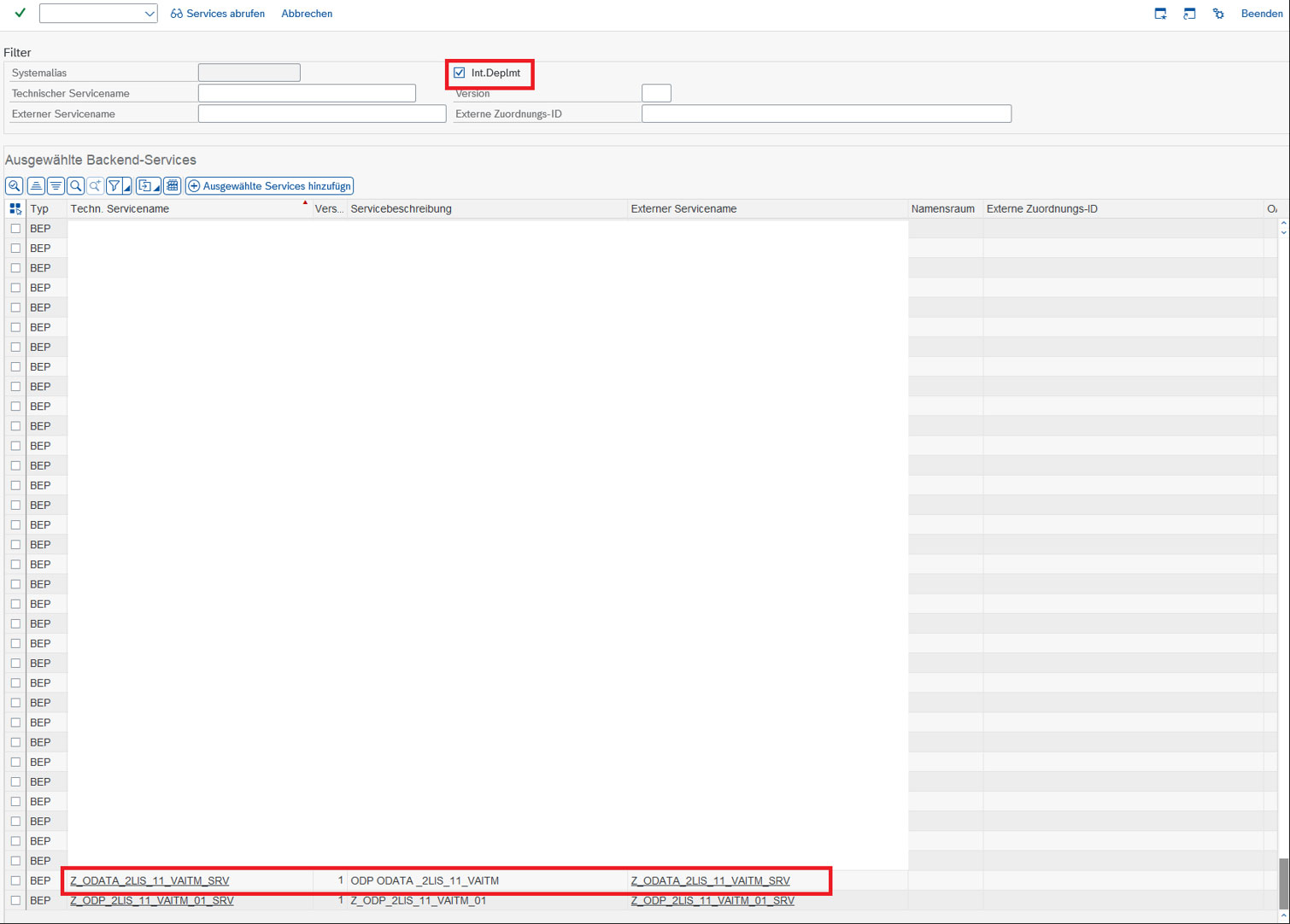
Service registration in /IWFND/MAINT_SERVICE
Verify activation ("the green light"):
Back in the overview, filter for your newly registered service (e.g., Z_ODATA*) and select it. In the lower-left pane (ICF Nodes), the traffic light must be green. If it’s not, right-click and choose Activate. In the lower-right pane (System Aliases), your alias should be set as "Default System."
Load metadata: Use Load Metadata to check whether the Gateway can correctly read the service definition. Errors like "System Alias not found" or an RFC error point to a misconfigured alias or a broken RFC connection.
Your service is now live, has a URL, and an active listener. Next, it's time to prove it actually works.
Phase 3: Testing and Validation
With the SAP Gateway Client (/IWFND/GW_CLIENT), you simulate an external consumer – such as a third-party system or a Fiori app – and then verify that the extraction was correctly logged in the ODP framework.
The "Hello World" test (metadata):
The request URI must end in $metadata, e.g., /sap/opu/odata/sap/Z_ODATA_SALES_EXT_SRV/$metadata.
Click Execute – you should get HTTP 200 OK with an XML document describing the entity sets and properties.
You can also test a simple $filter parameter directly against the entity set to narrow down the result set.
If this fails, first check whether the ICF node is active in SICF.
Extracting data (full load):
Since you're using the ODP framework, the first call counts as an initialization.
Change the request URI to your entity set, e.g., .../CustomerSet?$format=json.
For a realistic emulation, add a header called odp-subscriber-type with the value SAP_GW (optional for simple tests).
Click Execute – you should get HTTP 200 OK with a JSON list of the extracted data.
Checking extraction in ODQMON:
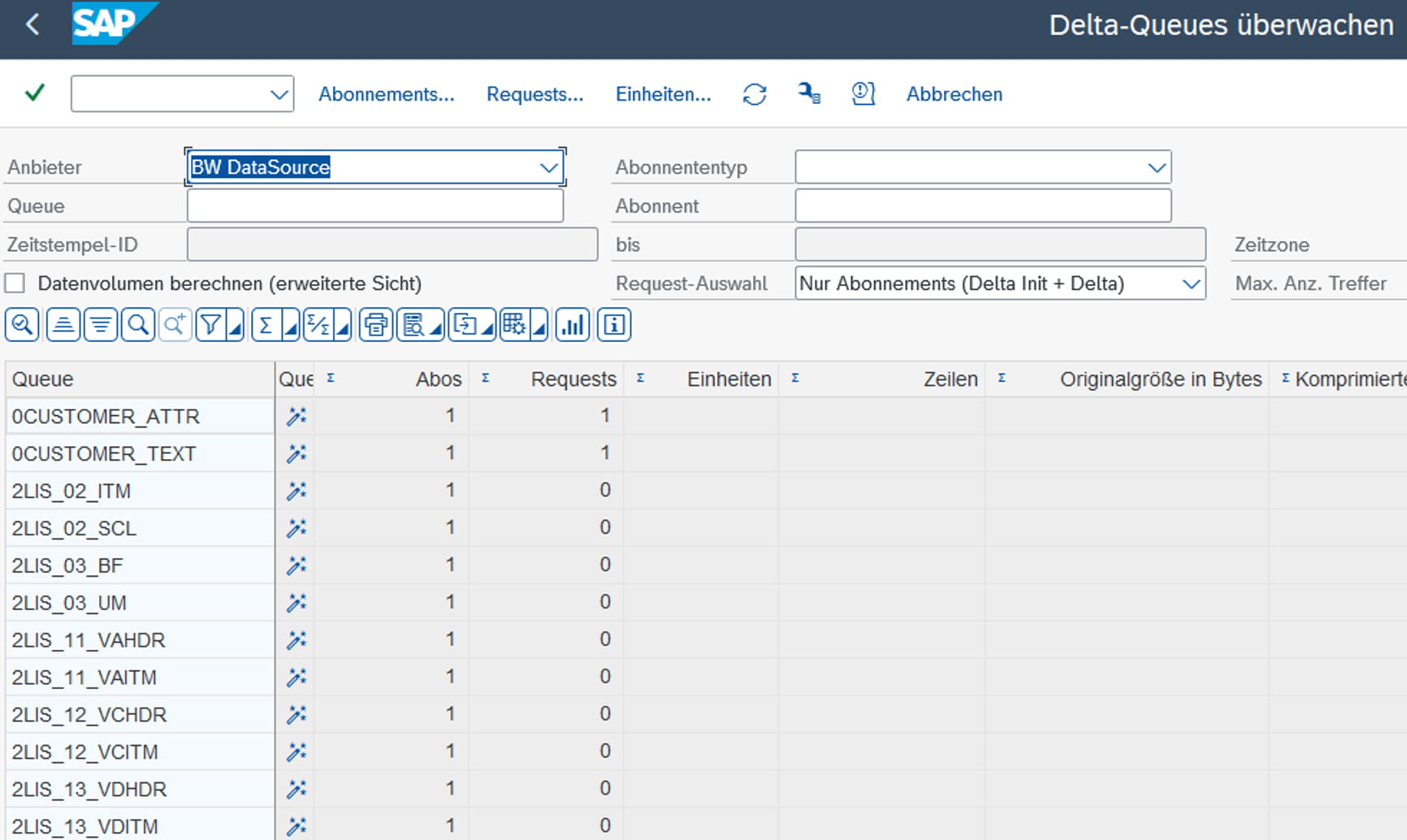
This is the proof that separates a real ODP extraction from a plain database query. In the Delta Queue Monitor, check the queue timestamp ("today"), the subscriber (SAP_GW or your own OData subscriber), and the provider (your SEGW project or the underlying extractor). An entry with request type "Subscription" or "Snapshot" at the matching time confirms your interface is genuinely being handled by the ODP framework.
If your extractor supports deltas (e.g., 2LIS* or CDC-enabled CDS views):
Look in the response body for the __next link or the delta token (e.g., !deltatoken='20231027120000...').
Make a new request using that token: .../CustomerSet?!deltatoken='...'.
The first call usually returns an empty list. Change a record in the backend (e.g., via XD02) and call it again – you'll get back only the changed record.
Watch Out: Handling Subscriptions Correctly
One of the most dangerous pitfalls with ODP-based OData is accidentally resetting a subscription.
The ODP framework identifies a subscriber by user ID and service name. If User A calls the service, they get subscription 1; User B gets subscription 2. Best practices: always use a dedicated, generic system user (e.g., ODATA_USER) for third-party extractions, rather than a personal ID.
If you call the base URL without a delta token, the system treats it as a new initialization. The previous subscription is terminated, and any unread delta records are lost for that consumer. The rule: once you have a first delta token, use it for every subsequent call. Only call the base URL if you deliberately want to reload everything from scratch.
Controlling behavior via HTTP headers – especially relevant for ETL tools:
Prefer: odata.track-changes – explicitly tells the server you want to subscribe to deltas, and ensures a delta token is provided even if the result set is currently empty.
Prefer: odata.maxpagesize=500 – controls server-side paging. With a million records, this prevents timeouts, since the response comes back in chunks of 500, including a skip token for the next page.
Pro tip for ETL loops: call the initial load with odata.track-changes → page through using the skip token until done → safely store the delta token from the final page → start the next run with exactly that token.
Phase 4: Troubleshooting
When an OData call fails, the browser message ("500 Internal Server Error") is rarely helpful. These three logs will get you further:
/IWFND/ERROR_LOG (Gateway/hub system): your first stop for any HTTP error. The "Request Context" button shows exactly which URI triggered the error; "Replay" reproduces the call directly in the Gateway Client.
/IWBEP/ERROR_LOG (ECC/S4 backend): needed for hub deployments when /IWFND/ERROR_LOG only shows a generic RFC error. Here you'll find ABAP dumps, authorization failures, or mapping issues from the business logic.
SLG1 (object /IWBEP/): useful for deeper system issues such as cache invalidation or inconsistent metadata.
Common issues and fixes:
Symptom
Probable Cause
Fix
HTTP 403 Forbidden
Missing authorization
Check SU53, assign the service group in PFCG
HTTP 404 Not Found
Service not registered / wrong alias
Check /IWFND/MAINT_SERVICE, verify system alias and ICF node
HTTP 500 Internal Server Error
ABAP dump in the backend
Check ST22, often data type mismatches
Metadata won't load
Cache issue
Run /IWFND/CACHE_CLEANUP and /IWBEP/CACHE_CLEANUP
No data in ODQMON
Standard OData used instead of ODP
Use the SEGW wizard "Redefine → ODP Extraction" instead of a manual entity set
Conclusion: From Code to Architecture
Building OData services in SAP S/4HANA or ECC is no longer just a coding task – it's about understanding the architecture. We've covered the path from development in SEGW, through correct delta handling in the ODP framework, to registration in /IWFND/MAINT_SERVICE, and finally validation with the Gateway Client and ODQMON.
Your key takeaways:
Respect the architecture: know whether you're working embedded or hub.
Use ODP: for extraction to third-party tools, ODP-based OData is the only robust, compliant path.
Manage your deltas: understand how subscriptions work – don't restart the URL unless you want to kill your delta queue.
Monitor: use the dedicated logging transactions, not just the browser console.
Want to modernize your entire SAP data integration landscape beyond OData? Whether it's replication via SAP Datasphere and BDC Connect, near-real-time scenarios with Replication Flows, or a future-proof architecture aligned with the SAP Business Data Cloud – we support you end-to-end.
Want To Learn More? Contact Us!
Your contact person
Olaf Bowe
Domain Lead Insights & Information Design
Who is b.telligent?
b.telligent – that’s Data Analytics, AI, Customer Engagement, and Data Visualization. It’s Germany, Austria, Switzerland, and Romania. But most importantly, it’s our team: people with a true passion for data, working together to create innovative solutions that drive sustainable progress for businesses.
SAP data integration is complex: performance issues, storage limitations, and third-party system integration pose significant challenges for businesses. With our flexible framework, you can create a powerful and scalable solution that seamlessly complements SAP BW and S/4HANA—efficient, future-proof, and cost-effective.
With the new function REPLACEEXPRESSION, arcplan 7 affords the possibility to influence the automatically generated SQL and MDX statement. This has the benefit that a design can continue to be made with “arrows” and that one is not limited to formulas. Currently, only simple adjustments of the query are possible with this tool; however, there is a large impact on the resulting possibilities.
With the Q2 2023 updated titled "New optimized story experience - unified strories and applications", SAP analytics cloud offers users new ways to develop reports and dashboards even more flexibly and easily in an integrated design enviroment. We'll showyou which new features theupdate provides and how it supports you in creating reports,